LinkedIn plays an important role in B2B sales, recruitment, networking, lead generation, and professional communication. For agencies and growing sales teams, working with more than one LinkedIn account may become part of everyday operations.
As the number of accounts increases, however, account management becomes more complicated.
Each account may have its own login session, browser data, assigned team member, network configuration, and business purpose. Without a structured system, teams can easily open the wrong account, mix browser sessions, lose cookies, or share credentials in insecure ways.
A practical solution is to combine a reliable account workflow with dedicated browser environments. This is where Outzeach and MoreLogin can work together.
Outzeach provides LinkedIn account solutions for businesses involved in outreach, recruitment, networking, and business development. MoreLogin provides isolated browser profiles and team-management features that help organizations keep different online account environments separate.
Together, the two services can support a more organized workflow for teams managing multiple LinkedIn accounts.
Why Multiple LinkedIn Accounts Become Difficult to Manage
Managing one LinkedIn account in a standard browser is usually straightforward. Managing ten, twenty, or more accounts is a different operational challenge.
A team may need to know:
- Which browser session belongs to each account
- Which employee or client is responsible for the account
- Which network configuration should be used
- Whether the correct cookies and login information are available
- What purpose the account serves
- Who is authorized to access it
Using a single browser for every account can create confusion. Logging in and out repeatedly may interrupt sessions, while keeping many accounts open in different tabs makes it easier for employees to work in the wrong account accidentally.
Standard Chrome profiles can provide basic separation, but they become harder to organize as the number of accounts and team members grows. For larger workflows, each account should be treated as a separate workspace.
What Is Outzeach?
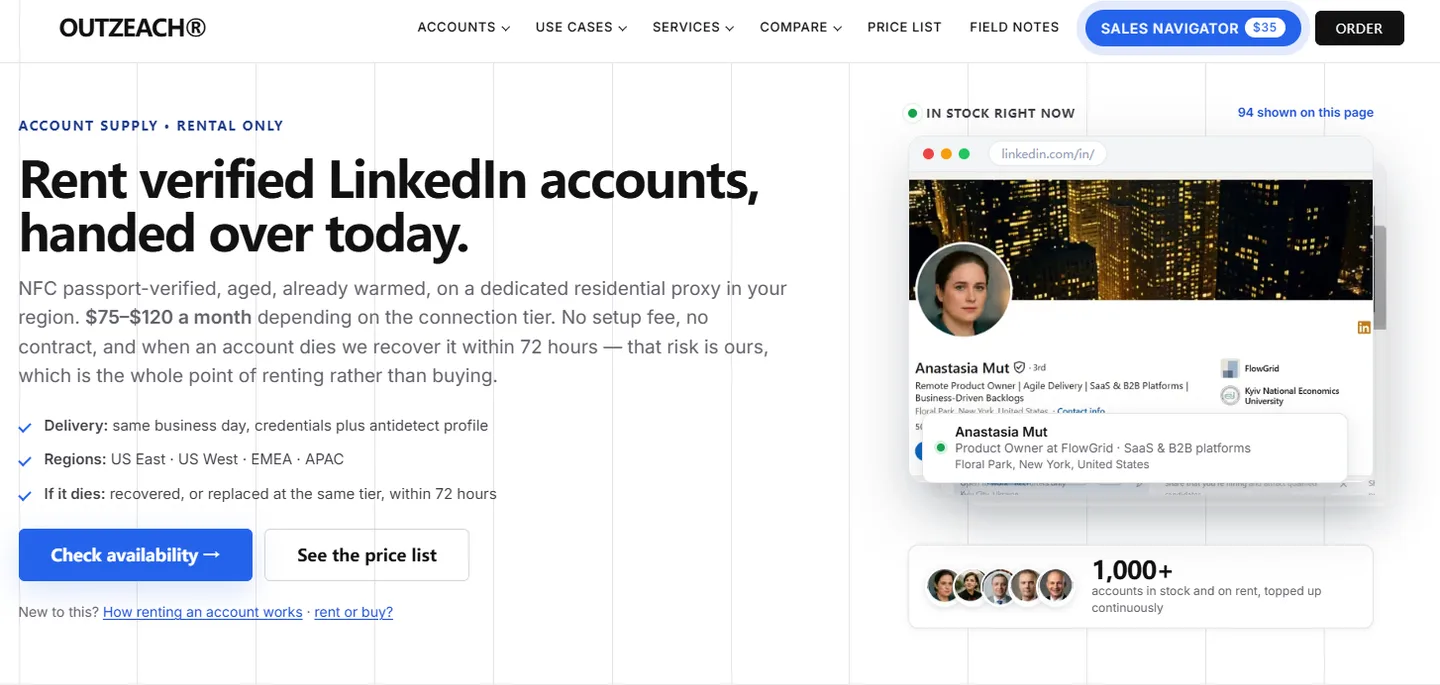
Outzeach provides LinkedIn account solutions for agencies, recruiters, sales teams, founders, and other businesses running professional outreach workflows.
Its services are designed for companies that need additional LinkedIn account capacity without building the entire sourcing and account-preparation process internally.
According to Outzeach, its account-rental service includes established LinkedIn profiles, dedicated region-matched proxies, browser-profile preparation, and replacement support under its published terms. The company also offers services such as account warm-up, Sales Navigator access, list building, profile optimization, outreach audits, and managed outreach.
This can be useful for organizations that want to expand a LinkedIn operation but do not want to source and prepare every account themselves.
Outzeach handles the account side of the workflow. MoreLogin provides the browser infrastructure teams can use to organize and access those account environments.
What Is MoreLogin?
MoreLogin is an anti-detect browser and multi-account browser-profile platform.
It allows users to create separate browser profiles for different online accounts. Each profile maintains its own browser data, cookies, login sessions, extensions, and configuration.
Instead of opening several LinkedIn accounts inside the same browser environment, a business can assign every account to a dedicated MoreLogin profile. For example:
- LinkedIn Account 01 → MoreLogin Profile 01
- LinkedIn Account 02 → MoreLogin Profile 02
- LinkedIn Account 03 → MoreLogin Profile 03
- LinkedIn Account 04 → MoreLogin Profile 04
Each profile can be opened independently when the corresponding account is required. This makes it easier for employees to identify the correct workspace and reduces the possibility of accidentally mixing sessions between unrelated accounts. MoreLogin publishes the workflows it is built around if you want to see whether yours is one of them.
How Outzeach and MoreLogin Fit Together
Outzeach and MoreLogin address different parts of the same operational problem.
Outzeach helps businesses obtain and prepare LinkedIn accounts for professional workflows. MoreLogin helps teams organize the browser environments used to access and manage those accounts.
Outzeach account → Dedicated MoreLogin profile → Authorized team member → Defined business workflow
Once an account is available, the team creates or imports its dedicated browser profile in MoreLogin. The profile is given a clear name, assigned to the appropriate employee, and used only for its intended LinkedIn account.
This gives the organization a clear relationship between the account, its browser environment, the person responsible for it, and the work being performed.
Use One Browser Profile for Each LinkedIn Account
A one-profile-per-account structure is one of the simplest ways to keep a multi-account workflow organized.
Each LinkedIn account should remain associated with its own MoreLogin browser profile rather than being moved between unrelated browser sessions.
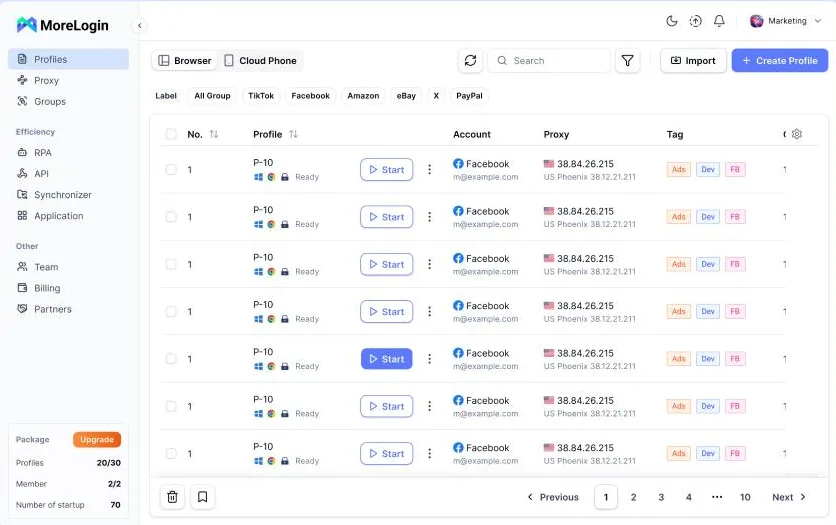
For example, an agency could use profile names such as:
- LinkedIn — Client A — Sales 01
- LinkedIn — Client A — Sales 02
- LinkedIn — Client B — Recruitment 01
- LinkedIn — Internal — Partnerships
- LinkedIn — Internal — Business Development
A consistent naming system helps employees find the correct environment without opening several profiles first.
Businesses can also add internal labels or records showing the account owner or client, the assigned employee, the account’s purpose, the relevant region, the date it was added, and its current operational status. This becomes increasingly valuable as the number of accounts grows.
Keep Account Environments Consistent
Consistency is important when managing professional accounts.
Teams should avoid moving an account unnecessarily between unrelated browser environments or making frequent, unexplained configuration changes. A stable operating process is easier for employees to follow and easier for administrators to review.
When an Outzeach account is assigned to a MoreLogin profile, the team can keep its browser data and relevant configuration connected to that environment. The goal is not to change technical settings constantly. The goal is to create a predictable workspace that employees can use correctly.
Network settings should also reflect the organization’s legitimate operational requirements. If a dedicated proxy is supplied for an account, the corresponding MoreLogin profile can be configured according to the instructions provided with that account.
MoreLogin and Outzeach should not be treated as tools for bypassing LinkedIn’s policies or security systems. Users remain responsible for following LinkedIn’s User Agreement, platform rules, local laws, and any other policies applicable to their activities.
Manage Team Access More Effectively
Multiple-account workflows become more challenging when several employees need access.
Sharing usernames and passwords through spreadsheets, messaging applications, or unprotected documents creates unnecessary security and administrative risks. It also makes it difficult to control access when an employee changes roles or leaves the organization.
MoreLogin includes collaboration features that allow businesses to organize browser profiles and allocate them to team members according to their responsibilities. A company might structure access like this:
- Administrators manage profiles and permissions
- Sales representatives access assigned outreach accounts
- Recruiters access recruitment-related profiles
- Account managers access profiles associated with their clients
- Other employees receive access only when required
Employees do not necessarily need access to every account in the organization. They can be assigned only the profiles relevant to their work. This creates clearer responsibilities and makes onboarding and offboarding easier to manage.
Example: Managing 20 LinkedIn Accounts
Consider an agency managing 20 LinkedIn accounts across several clients.
Without a dedicated profile system, employees might rely on browser tabs, multiple Chrome windows, spreadsheets, and repeated login attempts. As activity increases, it becomes difficult to remember which session belongs to which client.
With Outzeach and MoreLogin, the agency could use the following process:
- Obtain the required LinkedIn account solution from Outzeach.
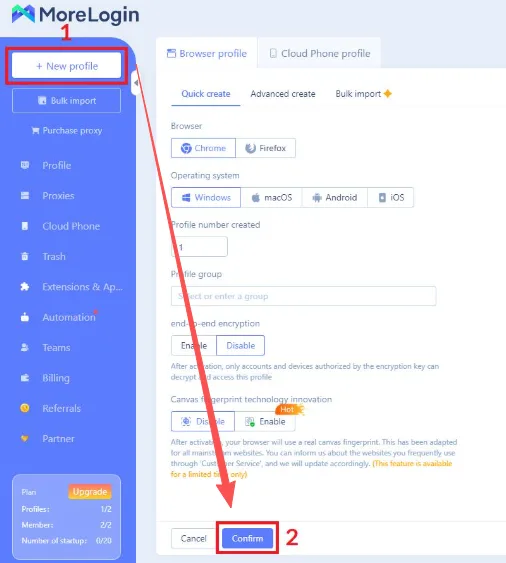
- Create a dedicated MoreLogin profile for the account.
- Apply the relevant browser and network configuration.
- Name the profile according to the client and intended workflow.
- Assign it to an authorized team member.
- Document the account’s purpose and responsible employee.
- Use that profile consistently for future access.
The agency would then have 20 clearly identified browser environments instead of 20 accounts mixed together inside a small number of browsers.
An employee working on Client A can open the profiles assigned to that client. Another employee working on Client B sees only the environments required for their own responsibilities.
This structure does not replace proper account governance, but it can make daily operations considerably easier to understand and manage.
Protecting Sessions and Account Information
Passwords are only one part of account security.
Browser profiles may also contain session cookies, authentication data, saved preferences, and extensions. When several people work with multiple accounts, this information should be handled carefully.
Businesses should follow basic security practices, including:
- Using strong and unique passwords
- Enabling multi-factor authentication where available
- Limiting access to authorized employees
- Reviewing team permissions regularly
- Removing access promptly when an employee leaves
- Avoiding credential sharing through unsecured channels
- Maintaining clear internal account records
MoreLogin provides the profile-management layer, but companies must still establish and enforce their own security procedures. The operating rules we write our own replacement guarantee against are set out in full here.
Building a Scalable Daily Workflow
The greatest benefit of a structured browser-profile system is often operational clarity.
Instead of starting each task by identifying the correct browser, login, and session, an employee can launch the profile associated with the account they need. For agencies, recruiters, and sales teams, this can reduce time spent on repetitive account switching and troubleshooting.
A scalable workflow should include:
- One dedicated profile per LinkedIn account
- A consistent profile-naming convention
- Defined ownership for every profile
- Controlled employee permissions
- Stable browser and network configurations
- Secure credential-management practices
- Documented procedures for adding or removing accounts
- Regular reviews of active profiles and team access
Automation features should be used carefully and responsibly. Organizations should understand LinkedIn’s applicable rules and limits before implementing automated activities.
No browser, proxy, account provider, or software platform can guarantee that an account will never be challenged, limited, or restricted.
Final Thoughts
Managing multiple LinkedIn accounts requires more than simply opening additional browser tabs.
Teams need a clear system for separating browser sessions, assigning employee access, protecting account information, and documenting responsibility for each account.
Outzeach and MoreLogin can support different parts of that system. Outzeach provides LinkedIn account solutions for professional outreach, recruitment, networking, and business-development workflows. MoreLogin provides isolated browser profiles and team-management tools that help businesses organize separate account environments.
One account. One browser profile. One assigned purpose. Controlled team access.
To see the browser-profile and team-management features in detail, start with the MoreLogin anti-detect browser, compare the MoreLogin plans, or download MoreLogin and build the first profile. To explore LinkedIn account solutions for professional teams, see Outzeach account rental or the price list.
Users should always comply with LinkedIn’s terms, applicable laws, and the policies governing their accounts and activities.