Short answer: the safe way to manage multiple LinkedIn presences is to manage legitimate accounts, Pages, and authorized client work separately. It is not to create duplicate personal profiles, rent someone else’s identity, share passwords loosely, or use browser automation to imitate human activity. Good operations make ownership, permissions, data, and working context clear.
That distinction matters more than most teams expect. LinkedIn says that a profile should have one owner and that creating multiple profiles is not allowed. It also says it does not permit third-party software or extensions that scrape, alter, or automate activity on LinkedIn’s website. For teams with a genuine need for professional account handling, LinkedIn has introduced Handled LinkedIn Accounts for eligible, authorized arrangements.
This guide explains how an agency, recruiting team, founder-led sales team, or social media team can build a safer LinkedIn operating model without treating platform rules as an obstacle to work around.
The pain point: one busy team, six LinkedIn logins, and no clear line between them
It usually starts innocently. A small agency signs three clients. A founder asks an assistant to publish a post. An SDR needs access to a company Page. A recruiter is away for a week. Someone saves credentials in a shared spreadsheet because “it is only temporary.”
Within a month, the team has an ugly mix of browser tabs, shared passwords, personal profiles, Page admin roles, and client accounts. A post goes out from the wrong profile. A contractor retains access after a project ends. One person sends repetitive connection requests too quickly. Then a login challenge or a restriction arrives, and nobody can say who did what, from where, or whether the account holder ever approved it.
The underlying problem is not that the team has “too many accounts.” It is that accounts with different owners, purposes, and permissions have been treated as interchangeable.
The safer model
One real person per personal profile, native LinkedIn permissions wherever available, written authorization for managed profiles, and a separate working environment for every approved client or account owner.
First, define what “multiple LinkedIn accounts” means
Before choosing a tool, separate the legitimate use cases from the risky ones. The word “account” is often used for several very different things.
| Situation | Safe operating approach | Avoid |
|---|---|---|
| One person has two personal profiles | Keep the primary profile and use LinkedIn’s official process to merge or close duplicates. | Maintaining separate identities for separate campaigns or regions. |
| A company or client needs content published | Use LinkedIn Page roles and a documented approval workflow. | Creating a personal profile for the company or sharing a founder’s password informally. |
| An executive wants authorized support | Ask whether the account is eligible for LinkedIn’s Handled Account program and obtain the owner’s written authorization. | Letting multiple freelancers use the same personal login. |
| An agency serves several clients | Keep each client’s approved assets, documents, and browser session in a separately named workspace with least-privilege access. | Mixing client cookies, exports, files, and credentials in one shared browser profile. |
What LinkedIn’s rules mean for a safe workflow
Start with the rules you cannot solve with a browser setting. LinkedIn’s profile guidance says that profiles should have one account owner and that personal login information should not be shared or transferred. If a person accidentally has duplicate profiles, LinkedIn provides a path to merge or close duplicate accounts.
For teams, the useful nuance is authorization. LinkedIn’s Handled LinkedIn Accounts program recognizes that an executive assistant or social media manager may legitimately support an account. That does not turn a personal profile into a team-owned asset. The person remains responsible for the account, and the team should still follow LinkedIn’s Professional Community Policies.
Automation deserves the same clarity. LinkedIn’s official automated activity policy says that third-party software and browser extensions that scrape, modify, or automate website activity are not allowed. A safe workflow is therefore built around real, reviewable work: researched prospects, relevant messages, human approval, and sensible pacing. It is not built around trying to disguise automated sending.
The compliance-first system for managing LinkedIn at scale
1. Create an account and asset register
Use a simple register before you add anyone to a workflow. For every personal profile, Company Page, ad account, Recruiter seat, Sales Navigator seat, or client workspace, record the owner, business purpose, authorized operators, access method, and offboarding date. Keep passwords out of the register. Store them in an approved password manager instead.
This is not administrative theatre. If an employee leaves, a client changes agencies, or LinkedIn asks for verification, your team needs to know exactly who is accountable for each asset.
2. Use native LinkedIn roles before shared credentials
Where LinkedIn offers a role, use the role. Company Pages, Campaign Manager, Recruiter, and other business products are designed to support organizational access. A role creates a clearer boundary than a shared personal password and makes it easier to remove access when a contract ends.
For executive-led content or outreach, agree on the division of work in writing. For example, the account owner approves topics and final messages; an authorized manager drafts content, organizes replies, and maintains a response queue. If the arrangement qualifies, consider LinkedIn’s Handled Account route rather than assuming that a password handoff is acceptable.
3. Separate workspaces to prevent cross-client mistakes
Different clients and account owners should not share browser cookies, saved logins, downloaded lead files, extensions, or cloud storage shortcuts. This is primarily an operational security practice. It reduces the ordinary but expensive errors caused by opening the wrong tab or uploading the wrong file.
MostLogin provides isolated browser profiles, session separation, team access controls, and activity tracking. Used responsibly, those features can help an agency keep approved client environments distinct and make handovers cleaner. See the MostLogin browser profile and team collaboration features for the product detail, and the per-industry solutions if you want to see how other teams scope a workspace.
There is an important boundary: an isolated browser profile does not create permission to operate someone else’s LinkedIn profile. It does not make duplicate personal accounts compliant, and it does not make automated LinkedIn activity acceptable. Treat the browser profile as a container for an already-authorized workflow, not as a workaround for platform controls.
4. Give access according to the minimum needed
Do not give every contractor access to every client. Assign the smallest set of permissions needed to complete the work, then review access on a schedule. An editorial contractor may need a Page publishing role. A reporting specialist may need only exported, consented-to campaign data. A departing team member should be removed from the password manager, browser workspace, and native LinkedIn roles on the same day.
5. Make outreach personal and reviewable
“Safe” is not only a login question. It is also about how people experience your activity. LinkedIn advises members to send invitations to people they know and trust, and warns that unwanted or spam-reported invitations can lead to a temporary restriction. Build campaigns around relevance: a clear reason for contact, a truthful identity, a specific value exchange, and a human review before material messages are sent.
For commercial prospecting, also recognize LinkedIn’s commercial use limit. Do not try to outsmart the limit with more identities. Choose an appropriate LinkedIn business product, reduce unnecessary profile browsing, and improve qualification so that fewer, better conversations are needed.
Where anti-detect browsers fit, and where they do not
An anti-detect browser is often discussed as if it were an “account safety” button. It is not. Its practical value for a compliant team is isolation: keeping authorized workspaces from bleeding into each other and making shared operational processes easier to audit.
For example, an agency can use a dedicated social media management workspace for each client, with access granted only to the client team assigned to that project. The benefit is clean separation of sessions and work materials. The guardrail is just as important: every profile inside that workspace must still be a legitimate, properly authorized LinkedIn asset.
Do not use browser fingerprinting, proxies, or environment isolation to impersonate another person, bypass geographic restrictions, evade a restriction, or conceal prohibited automation. Those activities introduce legal, contractual, and account-security risk. The moment a workflow depends on hiding who controls an account, it has already moved away from safe account management.
A note on account rentals and third-party “ready-made” profiles
When teams are under pressure to increase outbound volume, they may encounter account-rental services. For transparency, Outzeach’s public site markets rented LinkedIn accounts supplied with proxies and anti-detect browser profiles. That model is not a substitute for a compliance-first operating system.
Even if a provider describes an account as verified, warmed, or consented to, the key question remains ownership and authorization under LinkedIn’s rules. LinkedIn states that a profile should have one owner, that personal login information should not be shared, and that certain automated activity is prohibited. Renting or operating a profile that represents somebody else can create account, privacy, and brand-trust risk. This article does not recommend using account-rental services.
A 30-day rollout plan for agencies and in-house teams
- Week 1: inventory. List every LinkedIn-related asset, owner, approved operator, purpose, and current access route. Identify duplicate profiles, shared credentials, unused seats, and former contractors.
- Week 2: clean up access. Move work to native roles where possible, turn on two-factor authentication, set up a password manager, and remove access that is not actively required.
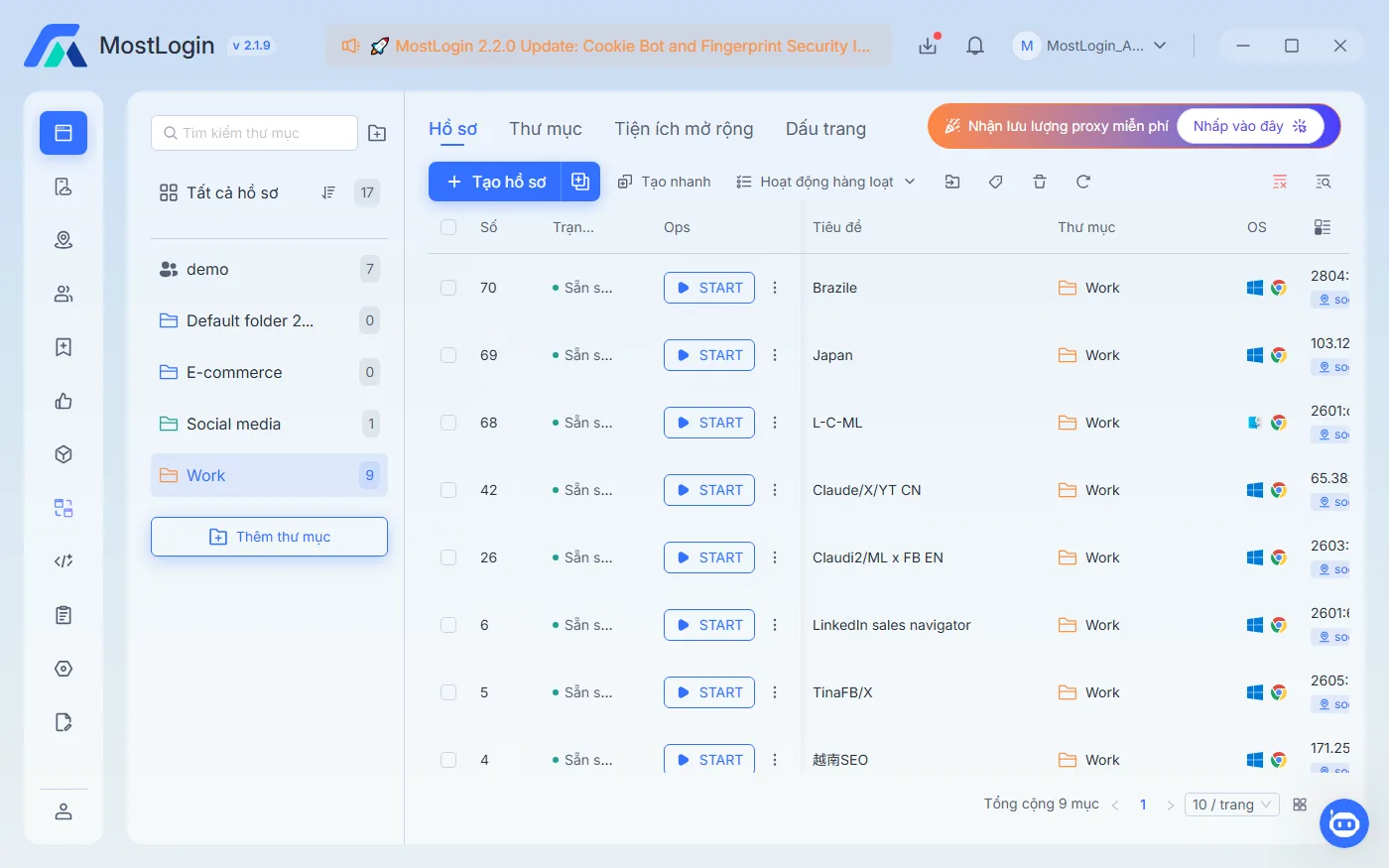
- Week 3: separate work contexts. Create one clearly named workspace per authorized client or account owner. Keep notes, assets, session data, and team permissions separated. Download MostLogin only if a separate browser-profile workflow genuinely improves that operational separation, and check the MostLogin plans against the number of workspaces you actually need.
- Week 4: establish governance. Write a one-page policy covering authorization, human review, message quality, client offboarding, incident reporting, and the ban on unapproved automation or rented identities.
How to respond if a LinkedIn account is restricted
Do not immediately open another profile or switch to a new identity. Pause the questionable workflow first. Review the restriction notice, disable any tools or extensions that automated LinkedIn activity, secure the account, and use LinkedIn’s official review or support path where available.
Then conduct a short internal review: Who had access? Was the account part of an approved managed-account arrangement? Were messages relevant and human-reviewed? Were browser extensions, automations, or account-sharing practices involved? A factual answer is more useful than a quick workaround, because it prevents the same risk from being repeated across other client accounts.
Conclusion: manage relationships, not a fleet of identities
Safe LinkedIn operations are built on clear ownership, explicit permission, careful access control, and meaningful human interaction. That approach is slower than renting profiles or multiplying accounts, but it protects the relationships that make LinkedIn valuable in the first place.
If your team needs to keep legitimate client environments organized, explore mostlogin.com and design each browser profile around a documented, authorized account owner. Keep the platform’s own rules at the centre of the workflow, and let tools serve that discipline rather than replace it.